My first night building this lab, I didn’t get a single clean run. I hit five errors in a row. Each one taught me something about how Azure actually works, so here they are.
| # | Error | What it meant | Fix |
|---|---|---|---|
| 1 | “You don’t have access to this” | My school blocks device-code sign-in | Used regular browser sign-in |
| 2 | SubscriptionNotFound | New subscription, services not registered | Registered resource providers |
| 3 | RequestDisallowedByAzure | Student subscription only allows some regions | Moved to North Central US |
| 4 | InvalidResourceGroupLocation | Leftover resource group in the old region | Deleted it and re-ran |
| 5 | SkuNotAvailable | No capacity for that VM size | Changed one variable |
1. My school blocked one sign-in method
I tried signing in to the Azure CLI with az login --use-device-code. The sign-in succeeded, but then I got “You don’t have access to this.” My school’s IT blocks that sign-in method for student accounts, which is a common security policy.
Fix: I used the regular browser sign-in instead. Because I’m on Linux inside Windows (WSL), it couldn’t open a browser on its own, so I copied the sign-in link into my browser manually. That worked.
az login2. SubscriptionNotFound
My first attempt to create a storage account failed with SubscriptionNotFound, even though my subscription clearly existed. It turns out brand-new Azure subscriptions need each service “registered” before you can use it.
az provider register --namespace Microsoft.Storage
az provider register --namespace Microsoft.Network
az provider register --namespace Microsoft.Compute
I checked the status every 30 seconds or so until all three said Registered.
3. RequestDisallowedByAzure
Next, Azure refused to create anything in eastus. My Azure for Students subscription has a policy that only allows certain regions. I looked it up:
az policy assignment list --query "[].parameters" -o jsonThe allowed list was North Central US, Canada Central, Sweden Central, Norway East, and France Central. I picked North Central US because it’s closest to Georgia.
4. InvalidResourceGroupLocation
When I re-ran my setup in the new region, it failed again: the resource group already existed in eastus from my first attempt, and a resource group can’t move regions. I deleted it and started clean.
az group delete --name rg-homelab-tfstate --yes5. SkuNotAvailable
Finally, terraform apply built 10 of my 12 resources, then both VMs failed: Azure had no capacity for the Standard_B1s size in my region.
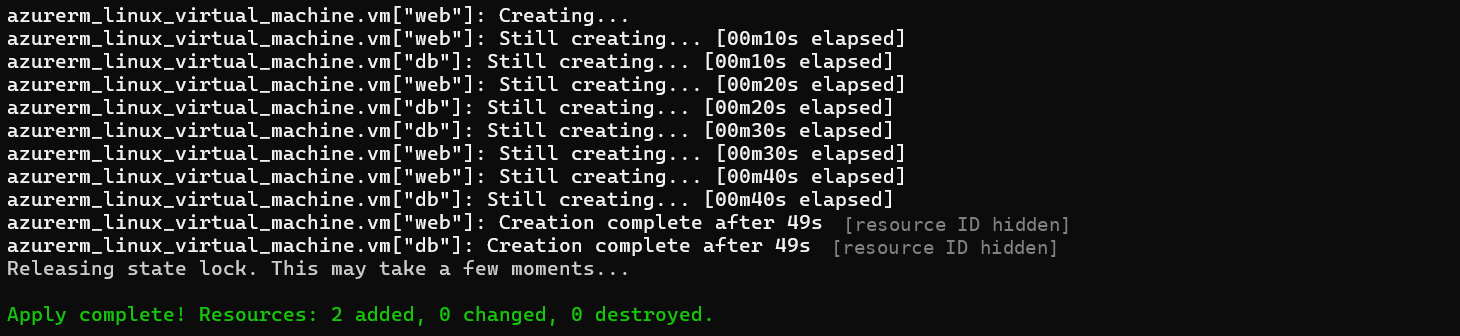
Fix: I changed one variable to a different small size, Standard_B2ats_v2, and ran terraform plan again. It said “Plan: 2 to add.” Terraform’s state file remembered the 10 resources it had already built, so it only created the two missing VMs. They finished in 49 seconds.
What I learned
Every one of these error messages told me exactly what was wrong. The skill isn’t avoiding errors. It’s reading them carefully and fixing one thing at a time.