Category: Terraform

Building infrastructure with code: networks, firewalls, and virtual machines in Azure, all defined in Terraform.

  • Terraform vs. Ansible: What Each One Actually Does

    Terraform vs. Ansible: What Each One Actually Does

    When I started learning infrastructure as code, I kept mixing up Terraform and Ansible. They’re both written as code, and they both deal with servers. Building my own lab is what finally made the difference click.

    The short version

    Terraform builds the house. Ansible furnishes it.

    TerraformAnsible
    Main jobCreates infrastructure (provisioning)Sets up what’s inside it (configuration)
    In my labNetwork, firewall, public IPs, 2 VMsMySQL, Apache, PHP, WordPress
    How you write itHCL: you describe the end resultYAML: a list of tasks
    How it knows what existsA state fileChecks each server every run

    Terraform: building the infrastructure

    Here’s a small piece of my Terraform. It describes the firewall rule that only allows SSH from my home IP address:

    security_rule {
      name                   = "allow-ssh-from-admin"
      priority               = 100
      direction              = "Inbound"
      access                 = "Allow"
      protocol               = "Tcp"
      destination_port_range = "22"
      source_address_prefix  = var.admin_cidr
    }

    The workflow is always the same: terraform init, then terraform plan to preview the changes, then terraform apply to make them. The plan step is the safety check, because it shows exactly what will change before anything happens.

    Ansible: configuring the servers

    Once the servers exist, Ansible connects to them over SSH and sets them up. Here’s the task that installs Apache and PHP on my web server:

    - name: Install Apache and PHP
      ansible.builtin.apt:
        name:
          - apache2
          - php
          - php-mysql
          - libapache2-mod-php
        state: present

    Ansible is agentless, so nothing has to be installed on the servers first. It just needs SSH access.

    How they hand off to each other

    This is my favorite part. When Terraform finishes, it writes Ansible’s inventory file, the list of servers and their IP addresses. So Ansible always knows the real addresses, and I never have to copy them by hand.

    [web]
    web ansible_host=<web server IP>
    
    [db]
    db ansible_host=<database server IP>

    What I learned

    If I rebuilt my original LAMP project today, Terraform would create the server, and Ansible would install Apache, MySQL, and PHP and create each client’s user and permissions. What took me hours by hand would be two commands.
  • How I Built This Blog with Terraform and Ansible on Azure

    How I Built This Blog with Terraform and Ansible on Azure

    Welcome to Ingram Cloud Lab! I’m Marilyn, an MIS student at Georgia College, and this blog is where I document what I’m learning about cloud infrastructure, starting with the blog itself.

    Why I built it

    In one of my Linux courses, I set up a LAMP server on AWS by hand: installing Apache, MySQL, and PHP, then creating separate users and permissions for three client websites. It worked, but it was slow and easy to get wrong. I kept thinking: what if I needed fifty servers?

    That question led me to infrastructure as code, where servers, networks, and firewalls are described in files instead of set up by clicking. I’d taken courses on Terraform and Ansible, but I wanted to use them on something real. So I built the server this blog runs on.

    What’s running this site

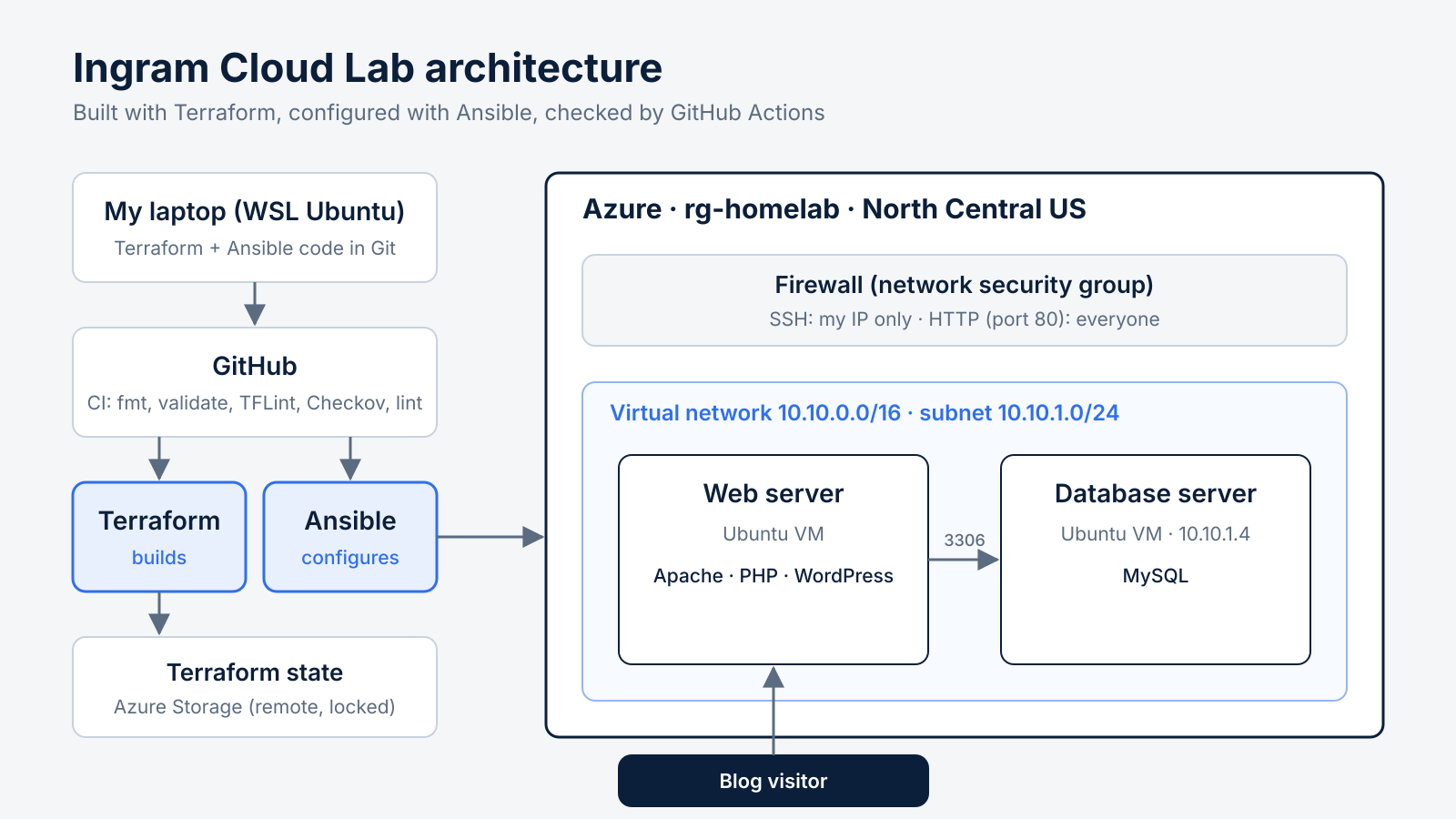
    • Terraform builds everything in Azure: a resource group, a virtual network and subnet, a firewall that only allows SSH from my IP, and two Ubuntu servers. Terraform’s state file is stored remotely in Azure Storage.
    • Ansible configures the servers. One runs MySQL. The other runs Apache, PHP, and WordPress, and connects to the database over the private network.
    • GitHub Actions checks every change I make, with format checks, a linter, and a security scan, before it’s merged.

    How a change gets from my laptop to Azure

    1. I change the code on a new Git branch.
    2. I open a pull request on GitHub, and the CI pipeline checks it automatically.
    3. Once the checks pass, I merge it.
    4. terraform apply builds or updates the infrastructure.
    5. ansible-playbook configures the servers.

    Right now I run the last two steps from my laptop. Connecting them to GitHub so they run automatically after I approve a change is my next project.

    A note on how I wrote the code

    I used AI to help generate the starting code, then I ran every piece myself and worked through every error. Honestly, that’s where most of the learning happened. I hit five different Azure errors on the first day, and I wrote about all of them in my next post.

    What I learned

    Terraform builds the house. Ansible furnishes it. Knowing which tool does which job made infrastructure as code finally make sense to me.

    The code for this whole site is public on GitHub: github.com/Marilyn-Ingram/homelab